Pandas iloc, loc, and ix functions are very powerful ways to quickly select data from your dataframe. Today , we take a quick look at these 3 functions.
Credits to Data School, you can check him out in Youtube
Out[3]:
|
City |
Colors Reported |
Shape Reported |
State |
Time |
| 0 |
Ithaca |
NaN |
TRIANGLE |
NY |
6/1/1930 22:00 |
| 1 |
Willingboro |
NaN |
OTHER |
NJ |
6/30/1930 20:00 |
| 2 |
Holyoke |
NaN |
OVAL |
CO |
2/15/1931 14:00 |
| 3 |
Abilene |
NaN |
DISK |
KS |
6/1/1931 13:00 |
| 4 |
New York Worlds Fair |
NaN |
LIGHT |
NY |
4/18/1933 19:00 |
Out[4]:
|
|
City Ithaca Colors Reported NaN Shape Reported TRIANGLE State NY Time 6/1/1930 22:00 Name: 0, dtype: object |
that returns a pandas series object
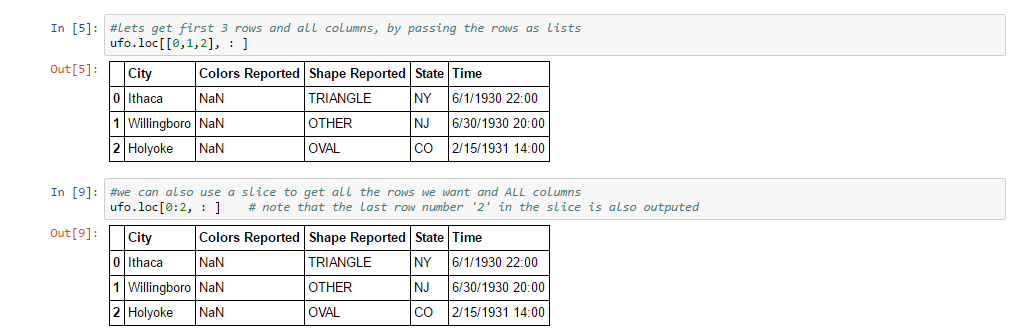
Out[5]:
|
City |
Colors Reported |
Shape Reported |
State |
Time |
| 0 |
Ithaca |
NaN |
TRIANGLE |
NY |
6/1/1930 22:00 |
| 1 |
Willingboro |
NaN |
OTHER |
NJ |
6/30/1930 20:00 |
| 2 |
Holyoke |
NaN |
OVAL |
CO |
2/15/1931 14:00 |
Out[9]:
|
City |
Colors Reported |
Shape Reported |
State |
Time |
| 0 |
Ithaca |
NaN |
TRIANGLE |
NY |
6/1/1930 22:00 |
| 1 |
Willingboro |
NaN |
OTHER |
NJ |
6/30/1930 20:00 |
| 2 |
Holyoke |
NaN |
OVAL |
CO |
2/15/1931 14:00 |
Out[11]:
|
City |
Colors Reported |
Shape Reported |
State |
Time |
| 0 |
Ithaca |
NaN |
TRIANGLE |
NY |
6/1/1930 22:00 |
| 1 |
Willingboro |
NaN |
OTHER |
NJ |
6/30/1930 20:00 |
| 2 |
Holyoke |
NaN |
OVAL |
CO |
2/15/1931 14:00 |
Out[14]:
1 2 3 4 5 6 7 8 9 10 11 12 13 14 15 16 17 18 19 20 21 22 23 24 25 26 27 28 29 30 31 32 33 34 35 36 37 38 39 40 41 42 43 44 45 46 47 48 49 50 51 52 53 54 55 56 57 58 59 60 61 62 |
0 Ithaca 1 Willingboro 2 Holyoke 3 Abilene 4 New York Worlds Fair 5 Valley City 6 Crater Lake 7 Alma 8 Eklutna 9 Hubbard 10 Fontana 11 Waterloo 12 Belton 13 Keokuk 14 Ludington 15 Forest Home 16 Los Angeles 17 Hapeville 18 Oneida 19 Bering Sea 20 Nebraska 21 NaN 22 NaN 23 Owensboro 24 Wilderness 25 San Diego 26 Wilderness 27 Clovis 28 Los Alamos 29 Ft. Duschene ... 18211 Holyoke 18212 Carson 18213 Pasadena 18214 Austin 18215 El Campo 18216 Garden Grove 18217 Berthoud Pass 18218 Sisterdale 18219 Garden Grove 18220 Shasta Lake 18221 Franklin 18222 Albrightsville 18223 Greenville 18224 Eufaula 18225 Simi Valley 18226 San Francisco 18227 San Francisco 18228 Kingsville 18229 Chicago 18230 Pismo Beach 18231 Pismo Beach 18232 Lodi 18233 Anchorage 18234 Capitola 18235 Fountain Hills 18236 Grant Park 18237 Spirit Lake 18238 Eagle River 18239 Eagle River 18240 Ybor Name: City, dtype: object |
Lets get multiple columns by passing a list
Out[19]:
|
City |
State |
| 0 |
Ithaca |
NY |
| 1 |
Willingboro |
NJ |
| 2 |
Holyoke |
CO |
| 3 |
Abilene |
KS |
| 4 |
New York Worlds Fair |
NY |
| 5 |
Valley City |
ND |
| 6 |
Crater Lake |
CA |
| 7 |
Alma |
MI |
| 8 |
Eklutna |
AK |
| 9 |
Hubbard |
OR |
| 10 |
Fontana |
CA |
| 11 |
Waterloo |
AL |
| 12 |
Belton |
SC |
| 13 |
Keokuk |
IA |
| 14 |
Ludington |
MI |
| 15 |
Forest Home |
CA |
| 16 |
Los Angeles |
CA |
| 17 |
Hapeville |
GA |
| 18 |
Oneida |
TN |
| 19 |
Bering Sea |
AK |
| 20 |
Nebraska |
NE |
| 21 |
NaN |
LA |
| 22 |
NaN |
LA |
| 23 |
Owensboro |
KY |
| 24 |
Wilderness |
WV |
| 25 |
San Diego |
CA |
| 26 |
Wilderness |
WV |
| 27 |
Clovis |
NM |
| 28 |
Los Alamos |
NM |
| 29 |
Ft. Duschene |
UT |
| … |
… |
… |
| 18211 |
Holyoke |
MA |
| 18212 |
Carson |
CA |
| 18213 |
Pasadena |
CA |
| 18214 |
Austin |
TX |
| 18215 |
El Campo |
TX |
| 18216 |
Garden Grove |
CA |
| 18217 |
Berthoud Pass |
CO |
| 18218 |
Sisterdale |
TX |
| 18219 |
Garden Grove |
CA |
| 18220 |
Shasta Lake |
CA |
| 18221 |
Franklin |
NH |
| 18222 |
Albrightsville |
PA |
| 18223 |
Greenville |
SC |
| 18224 |
Eufaula |
OK |
| 18225 |
Simi Valley |
CA |
| 18226 |
San Francisco |
CA |
| 18227 |
San Francisco |
CA |
| 18228 |
Kingsville |
TX |
| 18229 |
Chicago |
IL |
| 18230 |
Pismo Beach |
CA |
| 18231 |
Pismo Beach |
CA |
| 18232 |
Lodi |
WI |
| 18233 |
Anchorage |
AK |
| 18234 |
Capitola |
CA |
| 18235 |
Fountain Hills |
AZ |
| 18236 |
Grant Park |
IL |
| 18237 |
Spirit Lake |
IA |
| 18238 |
Eagle River |
WI |
| 18239 |
Eagle River |
WI |
| 18240 |
Ybor |
FL |
18241 rows × 2 columns
We can also specify a range
Out[16]:
|
City |
Colors Reported |
Shape Reported |
State |
| 0 |
Ithaca |
NaN |
TRIANGLE |
NY |
| 1 |
Willingboro |
NaN |
OTHER |
NJ |
| 2 |
Holyoke |
NaN |
OVAL |
CO |
| 3 |
Abilene |
NaN |
DISK |
KS |
| 4 |
New York Worlds Fair |
NaN |
LIGHT |
NY |
| 5 |
Valley City |
NaN |
DISK |
ND |
| 6 |
Crater Lake |
NaN |
CIRCLE |
CA |
| 7 |
Alma |
NaN |
DISK |
MI |
| 8 |
Eklutna |
NaN |
CIGAR |
AK |
| 9 |
Hubbard |
NaN |
CYLINDER |
OR |
| 10 |
Fontana |
NaN |
LIGHT |
CA |
| 11 |
Waterloo |
NaN |
FIREBALL |
AL |
| 12 |
Belton |
RED |
SPHERE |
SC |
| 13 |
Keokuk |
NaN |
OVAL |
IA |
| 14 |
Ludington |
NaN |
DISK |
MI |
| 15 |
Forest Home |
NaN |
CIRCLE |
CA |
| 16 |
Los Angeles |
NaN |
NaN |
CA |
| 17 |
Hapeville |
NaN |
NaN |
GA |
| 18 |
Oneida |
NaN |
RECTANGLE |
TN |
| 19 |
Bering Sea |
RED |
OTHER |
AK |
| 20 |
Nebraska |
NaN |
DISK |
NE |
| 21 |
NaN |
NaN |
NaN |
LA |
| 22 |
NaN |
NaN |
LIGHT |
LA |
| 23 |
Owensboro |
NaN |
RECTANGLE |
KY |
| 24 |
Wilderness |
NaN |
DISK |
WV |
| 25 |
San Diego |
NaN |
CIGAR |
CA |
| 26 |
Wilderness |
NaN |
DISK |
WV |
| 27 |
Clovis |
NaN |
DISK |
NM |
| 28 |
Los Alamos |
NaN |
DISK |
NM |
| 29 |
Ft. Duschene |
NaN |
DISK |
UT |
| … |
… |
… |
… |
… |
| 18211 |
Holyoke |
NaN |
DIAMOND |
MA |
| 18212 |
Carson |
NaN |
DISK |
CA |
| 18213 |
Pasadena |
GREEN |
FIREBALL |
CA |
| 18214 |
Austin |
NaN |
FORMATION |
TX |
| 18215 |
El Campo |
NaN |
OTHER |
TX |
| 18216 |
Garden Grove |
ORANGE |
LIGHT |
CA |
| 18217 |
Berthoud Pass |
NaN |
TRIANGLE |
CO |
| 18218 |
Sisterdale |
NaN |
DIAMOND |
TX |
| 18219 |
Garden Grove |
NaN |
CHEVRON |
CA |
| 18220 |
Shasta Lake |
BLUE |
DISK |
CA |
| 18221 |
Franklin |
NaN |
DISK |
NH |
| 18222 |
Albrightsville |
NaN |
OTHER |
PA |
| 18223 |
Greenville |
NaN |
NaN |
SC |
| 18224 |
Eufaula |
NaN |
DISK |
OK |
| 18225 |
Simi Valley |
NaN |
FORMATION |
CA |
| 18226 |
San Francisco |
NaN |
FORMATION |
CA |
| 18227 |
San Francisco |
NaN |
TRIANGLE |
CA |
| 18228 |
Kingsville |
NaN |
LIGHT |
TX |
| 18229 |
Chicago |
NaN |
DISK |
IL |
| 18230 |
Pismo Beach |
NaN |
OVAL |
CA |
| 18231 |
Pismo Beach |
NaN |
OVAL |
CA |
| 18232 |
Lodi |
NaN |
NaN |
WI |
| 18233 |
Anchorage |
RED |
VARIOUS |
AK |
| 18234 |
Capitola |
NaN |
TRIANGLE |
CA |
| 18235 |
Fountain Hills |
NaN |
NaN |
AZ |
| 18236 |
Grant Park |
NaN |
TRIANGLE |
IL |
| 18237 |
Spirit Lake |
NaN |
DISK |
IA |
| 18238 |
Eagle River |
NaN |
NaN |
WI |
| 18239 |
Eagle River |
RED |
LIGHT |
WI |
| 18240 |
Ybor |
NaN |
OVAL |
FL |
18241 rows × 4 columns
We can also combine the row and column selections
Out[17]:
|
City |
Colors Reported |
Shape Reported |
State |
| 0 |
Ithaca |
NaN |
TRIANGLE |
NY |
| 1 |
Willingboro |
NaN |
OTHER |
NJ |
| 2 |
Holyoke |
NaN |
OVAL |
CO |
We can also simply drop the time column to achieve the same result
Out[18]:
|
City |
Colors Reported |
Shape Reported |
State |
| 0 |
Ithaca |
NaN |
TRIANGLE |
NY |
| 1 |
Willingboro |
NaN |
OTHER |
NJ |
| 2 |
Holyoke |
NaN |
OVAL |
CO |
You can also select data using boolean statemet. example lets select where city = OAKLAND
Out[21]:
|
City |
Colors Reported |
Shape Reported |
State |
Time |
| 1694 |
Oakland |
NaN |
CIGAR |
CA |
7/21/1968 14:00 |
| 2144 |
Oakland |
NaN |
DISK |
CA |
8/19/1971 0:00 |
| 4686 |
Oakland |
NaN |
LIGHT |
MD |
6/1/1982 0:00 |
| 7293 |
Oakland |
NaN |
LIGHT |
CA |
3/28/1994 17:00 |
| 8488 |
Oakland |
NaN |
NaN |
CA |
8/10/1995 21:45 |
| 8768 |
Oakland |
NaN |
NaN |
CA |
10/10/1995 22:40 |
| 10816 |
Oakland |
NaN |
LIGHT |
OR |
10/1/1997 21:30 |
| 10948 |
Oakland |
NaN |
DISK |
CA |
11/14/1997 19:55 |
| 11045 |
Oakland |
NaN |
TRIANGLE |
CA |
12/10/1997 1:30 |
| 12322 |
Oakland |
NaN |
FIREBALL |
CA |
10/9/1998 19:40 |
| 12941 |
Oakland |
NaN |
CYLINDER |
CA |
1/23/1999 21:30 |
| 16803 |
Oakland |
NaN |
TRIANGLE |
MD |
7/4/2000 23:00 |
| 17322 |
Oakland |
NaN |
CYLINDER |
CA |
9/1/2000 21:35 |
Out[22]:
|
City |
Colors Reported |
Shape Reported |
State |
Time |
| 1694 |
Oakland |
NaN |
CIGAR |
CA |
7/21/1968 14:00 |
| 2144 |
Oakland |
NaN |
DISK |
CA |
8/19/1971 0:00 |
| 4686 |
Oakland |
NaN |
LIGHT |
MD |
6/1/1982 0:00 |
| 7293 |
Oakland |
NaN |
LIGHT |
CA |
3/28/1994 17:00 |
| 8488 |
Oakland |
NaN |
NaN |
CA |
8/10/1995 21:45 |
| 8768 |
Oakland |
NaN |
NaN |
CA |
10/10/1995 22:40 |
| 10816 |
Oakland |
NaN |
LIGHT |
OR |
10/1/1997 21:30 |
| 10948 |
Oakland |
NaN |
DISK |
CA |
11/14/1997 19:55 |
| 11045 |
Oakland |
NaN |
TRIANGLE |
CA |
12/10/1997 1:30 |
| 12322 |
Oakland |
NaN |
FIREBALL |
CA |
10/9/1998 19:40 |
| 12941 |
Oakland |
NaN |
CYLINDER |
CA |
1/23/1999 21:30 |
| 16803 |
Oakland |
NaN |
TRIANGLE |
MD |
7/4/2000 23:00 |
| 17322 |
Oakland |
NaN |
CYLINDER |
CA |
9/1/2000 21:35 |
We can also select specific rows with the boolean expression
Out[24]:
|
|
1694 CA 2144 CA 4686 MD 7293 CA 8488 CA 8768 CA 10816 OR 10948 CA 11045 CA 12322 CA 12941 CA 16803 MD 17322 CA Name: State, dtype: object |
Now lets tate a look at it ‘iloc’
iloc is for selecting rows and columns by integer position. that is what the ‘i’ stands for
Lets select all rows and columns in integer positions 0 and 3
Out[25]:
|
City |
State |
| 0 |
Ithaca |
NY |
| 1 |
Willingboro |
NJ |
| 2 |
Holyoke |
CO |
| 3 |
Abilene |
KS |
| 4 |
New York Worlds Fair |
NY |
| 5 |
Valley City |
ND |
| 6 |
Crater Lake |
CA |
| 7 |
Alma |
MI |
| 8 |
Eklutna |
AK |
| 9 |
Hubbard |
OR |
| 10 |
Fontana |
CA |
| 11 |
Waterloo |
AL |
| 12 |
Belton |
SC |
| 13 |
Keokuk |
IA |
| 14 |
Ludington |
MI |
| 15 |
Forest Home |
CA |
| 16 |
Los Angeles |
CA |
| 17 |
Hapeville |
GA |
| 18 |
Oneida |
TN |
| 19 |
Bering Sea |
AK |
| 20 |
Nebraska |
NE |
| 21 |
NaN |
LA |
| 22 |
NaN |
LA |
| 23 |
Owensboro |
KY |
| 24 |
Wilderness |
WV |
| 25 |
San Diego |
CA |
| 26 |
Wilderness |
WV |
| 27 |
Clovis |
NM |
| 28 |
Los Alamos |
NM |
| 29 |
Ft. Duschene |
UT |
| … |
… |
… |
| 18211 |
Holyoke |
MA |
| 18212 |
Carson |
CA |
| 18213 |
Pasadena |
CA |
| 18214 |
Austin |
TX |
| 18215 |
El Campo |
TX |
| 18216 |
Garden Grove |
CA |
| 18217 |
Berthoud Pass |
CO |
| 18218 |
Sisterdale |
TX |
| 18219 |
Garden Grove |
CA |
| 18220 |
Shasta Lake |
CA |
| 18221 |
Franklin |
NH |
| 18222 |
Albrightsville |
PA |
| 18223 |
Greenville |
SC |
| 18224 |
Eufaula |
OK |
| 18225 |
Simi Valley |
CA |
| 18226 |
San Francisco |
CA |
| 18227 |
San Francisco |
CA |
| 18228 |
Kingsville |
TX |
| 18229 |
Chicago |
IL |
| 18230 |
Pismo Beach |
CA |
| 18231 |
Pismo Beach |
CA |
| 18232 |
Lodi |
WI |
| 18233 |
Anchorage |
AK |
| 18234 |
Capitola |
CA |
| 18235 |
Fountain Hills |
AZ |
| 18236 |
Grant Park |
IL |
| 18237 |
Spirit Lake |
IA |
| 18238 |
Eagle River |
WI |
| 18239 |
Eagle River |
WI |
| 18240 |
Ybor |
FL |
18241 rows × 2 columns
We can also do a slice range of numbers. When you do a slice range of numbers, the selected data does not include the last number
in the slice
Out[26]:
|
City |
Colors Reported |
Shape Reported |
State |
| 0 |
Ithaca |
NaN |
TRIANGLE |
NY |
| 1 |
Willingboro |
NaN |
OTHER |
NJ |
| 2 |
Holyoke |
NaN |
OVAL |
CO |
| 3 |
Abilene |
NaN |
DISK |
KS |
| 4 |
New York Worlds Fair |
NaN |
LIGHT |
NY |
| 5 |
Valley City |
NaN |
DISK |
ND |
| 6 |
Crater Lake |
NaN |
CIRCLE |
CA |
| 7 |
Alma |
NaN |
DISK |
MI |
| 8 |
Eklutna |
NaN |
CIGAR |
AK |
| 9 |
Hubbard |
NaN |
CYLINDER |
OR |
| 10 |
Fontana |
NaN |
LIGHT |
CA |
| 11 |
Waterloo |
NaN |
FIREBALL |
AL |
| 12 |
Belton |
RED |
SPHERE |
SC |
| 13 |
Keokuk |
NaN |
OVAL |
IA |
| 14 |
Ludington |
NaN |
DISK |
MI |
| 15 |
Forest Home |
NaN |
CIRCLE |
CA |
| 16 |
Los Angeles |
NaN |
NaN |
CA |
| 17 |
Hapeville |
NaN |
NaN |
GA |
| 18 |
Oneida |
NaN |
RECTANGLE |
TN |
| 19 |
Bering Sea |
RED |
OTHER |
AK |
| 20 |
Nebraska |
NaN |
DISK |
NE |
| 21 |
NaN |
NaN |
NaN |
LA |
| 22 |
NaN |
NaN |
LIGHT |
LA |
| 23 |
Owensboro |
NaN |
RECTANGLE |
KY |
| 24 |
Wilderness |
NaN |
DISK |
WV |
| 25 |
San Diego |
NaN |
CIGAR |
CA |
| 26 |
Wilderness |
NaN |
DISK |
WV |
| 27 |
Clovis |
NaN |
DISK |
NM |
| 28 |
Los Alamos |
NaN |
DISK |
NM |
| 29 |
Ft. Duschene |
NaN |
DISK |
UT |
| … |
… |
… |
… |
… |
| 18211 |
Holyoke |
NaN |
DIAMOND |
MA |
| 18212 |
Carson |
NaN |
DISK |
CA |
| 18213 |
Pasadena |
GREEN |
FIREBALL |
CA |
| 18214 |
Austin |
NaN |
FORMATION |
TX |
| 18215 |
El Campo |
NaN |
OTHER |
TX |
| 18216 |
Garden Grove |
ORANGE |
LIGHT |
CA |
| 18217 |
Berthoud Pass |
NaN |
TRIANGLE |
CO |
| 18218 |
Sisterdale |
NaN |
DIAMOND |
TX |
| 18219 |
Garden Grove |
NaN |
CHEVRON |
CA |
| 18220 |
Shasta Lake |
BLUE |
DISK |
CA |
| 18221 |
Franklin |
NaN |
DISK |
NH |
| 18222 |
Albrightsville |
NaN |
OTHER |
PA |
| 18223 |
Greenville |
NaN |
NaN |
SC |
| 18224 |
Eufaula |
NaN |
DISK |
OK |
| 18225 |
Simi Valley |
NaN |
FORMATION |
CA |
| 18226 |
San Francisco |
NaN |
FORMATION |
CA |
| 18227 |
San Francisco |
NaN |
TRIANGLE |
CA |
| 18228 |
Kingsville |
NaN |
LIGHT |
TX |
| 18229 |
Chicago |
NaN |
DISK |
IL |
| 18230 |
Pismo Beach |
NaN |
OVAL |
CA |
| 18231 |
Pismo Beach |
NaN |
OVAL |
CA |
| 18232 |
Lodi |
NaN |
NaN |
WI |
| 18233 |
Anchorage |
RED |
VARIOUS |
AK |
| 18234 |
Capitola |
NaN |
TRIANGLE |
CA |
| 18235 |
Fountain Hills |
NaN |
NaN |
AZ |
| 18236 |
Grant Park |
NaN |
TRIANGLE |
IL |
| 18237 |
Spirit Lake |
NaN |
DISK |
IA |
| 18238 |
Eagle River |
NaN |
NaN |
WI |
| 18239 |
Eagle River |
RED |
LIGHT |
WI |
| 18240 |
Ybor |
NaN |
OVAL |
FL |
18241 rows × 4 columns
the returned data does not include the data at integer number 4, so it only returns 0,1,2,3 integer positions
lets select a set of rows and all columns
Out[28]:
|
City |
Colors Reported |
Shape Reported |
State |
Time |
| 0 |
Ithaca |
NaN |
TRIANGLE |
NY |
6/1/1930 22:00 |
| 1 |
Willingboro |
NaN |
OTHER |
NJ |
6/30/1930 20:00 |
| 2 |
Holyoke |
NaN |
OVAL |
CO |
2/15/1931 14:00 |
Now lets take a look at ix. it allows you to mix labels and integers. Tis kind of blend between loc and iloc
lets grab some new public data
Out[32]:
|
beer_servings |
spirit_servings |
wine_servings |
total_litres_of_pure_alcohol |
continent |
| country |
|
|
|
|
|
| Afghanistan |
0 |
0 |
0 |
0.0 |
Asia |
| Albania |
89 |
132 |
54 |
4.9 |
Europe |
| Algeria |
25 |
0 |
14 |
0.7 |
Africa |
| Andorra |
245 |
138 |
312 |
12.4 |
Europe |
| Angola |
217 |
57 |
45 |
5.9 |
Africa |
Lets select the first figure under beer servings for albania
we can also do the same thing like this way
lets select with slice range
Out[35]:
|
beer_servings |
spirit_servings |
| country |
|
|
| Albania |
89 |
132 |
| Algeria |
25 |
0 |
| Andorra |
245 |
138 |
important thing about ix. if you pass it slice range numbers and you have integer indexes or integer columns it will treat the passed
slice range as integers positions and returns all data inclusive of the both numbers in the slice. However if your columns or index has
labels instead of numbers and you pass a slice range number, ix will treat it as labels and we will return data not including the last number
in the slice
Out[36]:
|
City |
Colors Reported |
| 0 |
Ithaca |
NaN |
| 1 |
Willingboro |
NaN |
| 2 |
Holyoke |
NaN |
we have labels in our columns so ix treated the slice range as labels and returned index positions 0,1
but we had numbers in our index and ix treated them as integer positions and returns all data from 0,1 and 2