

Python

Use Python 2 and 3 Pyodbc and Sqlalchemy to connect to SQL Server Client 11.0
There are several ways you can use Python to connect to SQL Server and one of such ways is to use pyodbc and sqlalchemy Recent search terms:datapandas com
There are several ways you can use Python to connect to SQL Server and one of such ways is to use pyodbc and sqlalchemy Recent search terms:datapandas com
Sometimes, you would want to easily access and run your Python and R codes wherever you find yourself in the world once you have internet access. This is really handy when you have a mini-project you are working on , or you are going through an online tutorial, or you are trying to teach or
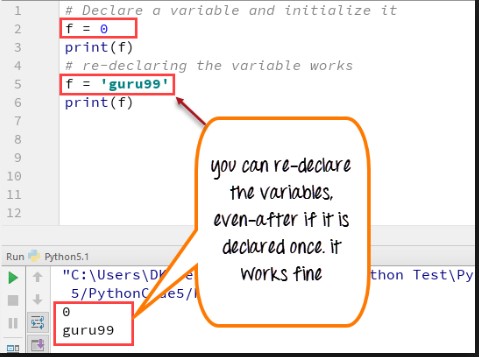
In Python, the scope ( Public, Protected, Private) characteristic of an attribute or member of the class is indicated by “the naming conventions of the member”. These are the naming conventions Public: This means the member can be accessed outside of the class by other instances. The naming convention denotes that it has no underscores
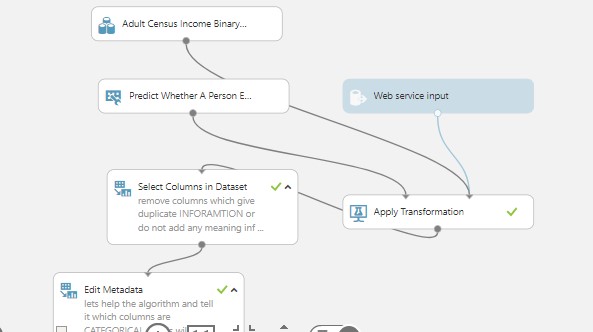
This is a script to consume Azure Machine Learning Model which you build using Azure ML Studio. So basically this is a Request-Response Service (RRS) according to Microsoft. This was a Boosted Decision Tree Algorithm build with Census Adult Data which is available as one of the Sample DataSet in Azure ML. You can adapt the


Clone this github repository into YOUR OWN repository and Edit the link in the Readme.md file from https://www.herokucdn.com/deploy/button.svg)](https://heroku.com/deploy?template=https://github.com/dugjason/superset-on-heroku to the link in YOUR OWN CLONED repository eg. https://www.herokucdn.com/deploy/button.svg)](https://heroku.com/deploy?template=https://github.com/benadaba/hrmr Now scroll down and COMMIT (save) the changes ALSO edit the requirements.txt file and include any database requirements you want installed . eg pymssql==2.1.3, pyodbc==4.0.21 (this version was generating an
If you have ever worked with Java, Python, R, SQL, Excel and other Languages on a varied Data Science or Data Analytics projects, you will realise that all these languages have similar syntaxes, or at least, can achieve the same objective with very similar codes. Below is a comparison and similarities of these various tools
Trying to learn new language when you already know another one is most at times easier to do. And it is much more so easy when the new language you want to pick up is very related to the one you already know in one way or the other. Both Java and Python are great
I was trying to run a pip install ( pip install scikit-learn) and I encountered this error:
|
1 2 3 4 5 6 7 8 9 10 11 12 13 14 15 16 17 18 19 20 21 22 23 24 |
C:\Users\adaba>pip install -U scikit-learn Collecting scikit-learn Using cached scikit_learn-0.18.1-cp27-cp27m-win_amd64.whl Installing collected packages: scikit-learn Found existing installation: scikit-learn 0.17.1 DEPRECATION: Uninstalling a distutils installed project (scikit-learn) has been deprecated and will be removed in a future version. This is due to the fact that uninstalling a distutils project will only partially uninstall the project. Uninstalling scikit-learn-0.17.1: Exception: Traceback (most recent call last): File "C:\Program Files\Anaconda2\lib\site-packages\pip\basecommand.py", line 215, in main status = self.run(options, args) File "C:\Program Files\Anaconda2\lib\site-packages\pip\commands\install.py", line 317, in run prefix=options.prefix_path, File "C:\Program Files\Anaconda2\lib\site-packages\pip\req\req_set.py", line 736, in install requirement.uninstall(auto_confirm=True) File "C:\Program Files\Anaconda2\lib\site-packages\pip\req\req_install.py", line 742, in uninstall paths_to_remove.remove(auto_confirm) File "C:\Program Files\Anaconda2\lib\site-packages\pip\req\req_uninstall.py", line 115, in remove renames(path, new_path) File "C:\Program Files\Anaconda2\lib\site-packages\pip\utils\__init__.py", line 267, in renames shutil.move(old, new) File "C:\Program Files\Anaconda2\lib\shutil.py", line 303, in move os.unlink(src) WindowsError: [Error 5] Access is denied: 'c:\\program files\\anaconda2\\lib\\site-packages\\scikit_learn-0.17.1-py2.7.egg-info' |
This is the bit we are interested in ”
|
1 |
WindowsError: [Error 5] Access is denied: 'c:\\program files\\anaconda2\\lib\\site-packages\\scikit_learn-0.17.1-py2.7.egg-info' |
” if you look at the error it states “WindowsError” Hence the Access Denied error is due to not having the right level of privileges to carry
This is a quick to create a dictionary object , write it to a JSON file and then read back the file and convert it to a dictionary and access the items in the dictionary. Credit to : codebasics. You can check him out on Youtube In [3]:
|
1 2 3 4 5 6 7 8 9 10 11 12 13 14 15 16 17 18 |
# lets create a dictionary of books book = {} book['Tom'] = { 'name':'Tom', 'address':'1 red street, NY', 'phone':98988988 } book['Bob'] = { 'name':'Bob', 'address':'1 green street, NY', 'phone':252525885 } |
In [6]:
|
1 2 3 4 |
#import json and pass the dictionary to it import json s = json.dumps(book) s |
Out[6]:
|
1 |
'{"Bob": {"phone": 252525885, "name": "Bob", "address": "1 green street, NY"}, "Tom": {"phone": 98988988, "name": "Tom", "address": "1 red street, NY"}}' |
In [14]:
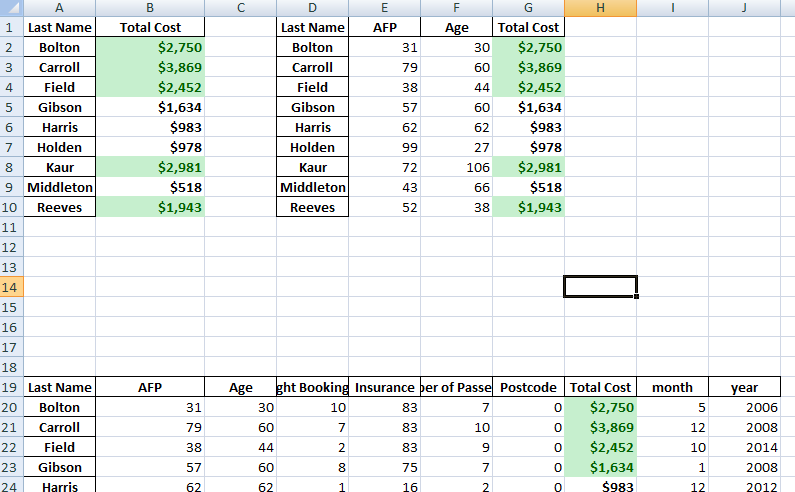
This is a just a bit of addition to a previous post, by formatting the Excel output further using the Python XlsxWriter package. The additions are : Colour formatting has been added to the Total Cost column The “Total Cost” has been given a money formatting The above uses row : column numeric values instead
An experienced DevOps and Cloud Training Company to meet your DevOps and Cloud needs
You can see how this popup was set up in our step-by-step guide: https://wppopupmaker.com/guides/auto-opening-announcement-popups/