
WindowsError: [Error 5] Access is denied: Anaconda Python Pip Installs and Upgrade
I was trying to run a pip install ( pip install scikit-learn) and I encountered this error:
|
1 2 3 4 5 6 7 8 9 10 11 12 13 14 15 16 17 18 19 20 21 22 23 24 |
C:\Users\adaba>pip install -U scikit-learn Collecting scikit-learn Using cached scikit_learn-0.18.1-cp27-cp27m-win_amd64.whl Installing collected packages: scikit-learn Found existing installation: scikit-learn 0.17.1 DEPRECATION: Uninstalling a distutils installed project (scikit-learn) has been deprecated and will be removed in a future version. This is due to the fact that uninstalling a distutils project will only partially uninstall the project. Uninstalling scikit-learn-0.17.1: Exception: Traceback (most recent call last): File "C:\Program Files\Anaconda2\lib\site-packages\pip\basecommand.py", line 215, in main status = self.run(options, args) File "C:\Program Files\Anaconda2\lib\site-packages\pip\commands\install.py", line 317, in run prefix=options.prefix_path, File "C:\Program Files\Anaconda2\lib\site-packages\pip\req\req_set.py", line 736, in install requirement.uninstall(auto_confirm=True) File "C:\Program Files\Anaconda2\lib\site-packages\pip\req\req_install.py", line 742, in uninstall paths_to_remove.remove(auto_confirm) File "C:\Program Files\Anaconda2\lib\site-packages\pip\req\req_uninstall.py", line 115, in remove renames(path, new_path) File "C:\Program Files\Anaconda2\lib\site-packages\pip\utils\__init__.py", line 267, in renames shutil.move(old, new) File "C:\Program Files\Anaconda2\lib\shutil.py", line 303, in move os.unlink(src) WindowsError: [Error 5] Access is denied: 'c:\\program files\\anaconda2\\lib\\site-packages\\scikit_learn-0.17.1-py2.7.egg-info' |
This is the bit we are interested in ”
|
1 |
WindowsError: [Error 5] Access is denied: 'c:\\program files\\anaconda2\\lib\\site-packages\\scikit_learn-0.17.1-py2.7.egg-info' |
”
if you look at the error it states “WindowsError”
Hence the Access Denied error is due to not having the right level of privileges to carry out the installs or upgrade.
SOLUTION
Open Command Prompt as Administrator (with Administrator rights)
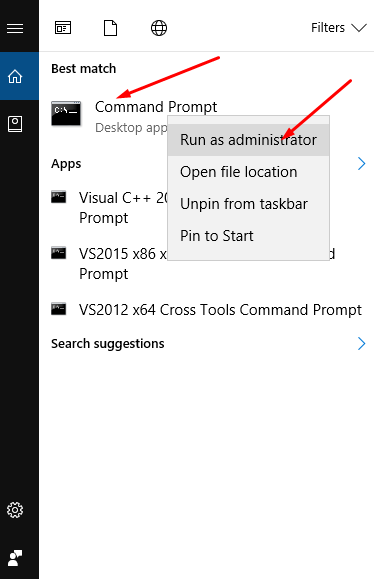
- Now run your pip installs and the windowsError should disappear and installation go through
-
1234567891011121314151617181920212223Microsoft Windows [Version 10.0.14393](c) 2016 Microsoft Corporation. All rights reserved.C:\WINDOWS\system32>cd\C:\>PythonPython 2.7.12 |Anaconda 4.2.0 (64-bit)| (default, Jun 29 2016, 11:07:13) [MSC v.1500 64 bit (AMD64)] on win32Type "help", "copyright", "credits" or "license" for more information.Anaconda is brought to you by Continuum Analytics.Please check out: http://continuum.io/thanks and https://anaconda.orgCould not open PYTHONSTARTUPIOError: [Errno 2] No such file or directory: 'C:\\Users\\adaba\\Anaconda3\\envs\\gl-env\\Lib\\site-packages\\spyderlib\\scientific_startup.py'>>>C:\>pip install -U scikit-learnCollecting scikit-learnUsing cached scikit_learn-0.18.1-cp27-cp27m-win_amd64.whlInstalling collected packages: scikit-learnFound existing installation: scikit-learn 0.17.1DEPRECATION: Uninstalling a distutils installed project (scikit-learn) has been deprecated and will be removed in a future version. This is due to the fact that uninstalling a distutils project will only partially uninstall the project.Uninstalling scikit-learn-0.17.1:Successfully uninstalled scikit-learn-0.17.1Successfully installed scikit-learn-0.18.1
Hope this helps you 🙂
Want more information like this?
I am running as administrator. Still I have this error.
File “c:\python27\lib\site-packages\pip\_vendor\retrying.py”, line 200, in call
attempt = Attempt(fn(*args, **kwargs), attempt_number, False)
File “c:\python27\lib\site-packages\pip\utils\__init__.py”, line 102, in rmtree
onerror=rmtree_errorhandler)
File “c:\python27\lib\shutil.py”, line 252, in rmtree
onerror(os.remove, fullname, sys.exc_info())
File “c:\python27\lib\site-packages\pip\utils\__init__.py”, line 110, in rmtree_errorhandler
if os.stat(path).st_mode & stat.S_IREAD:
WindowsError: [Error 5] Access is denied: ‘c:\\users\\XXXX\\appdata\\local\\temp\\pip-vawmxw-unpack\\pytz-2017.2-py2.py3-none-any.whl’
Hi Aneesh,
Can you check that the file is not being accessed or opened by any other program.
Sometimes the file might be accessed by another program without you realising. A simple case of restart and running command prompt as an administrator might help solve it