How to Manually Start Stop and Restart MySql Server on Windows PC

When installing MySql server  package, you can instruct the installation to configure MySql server to start automatically on each windows start up. However, if you want to reserve resources whilst you will not be working with the MySql server and hence you do not want the server to automatically start up on every boot of your PC, you would want to manually start the MySql whenever you need it.

Follow this simple guide to manually start MySql server on your windows PC. (I am illustrating from Windows 10 PC)


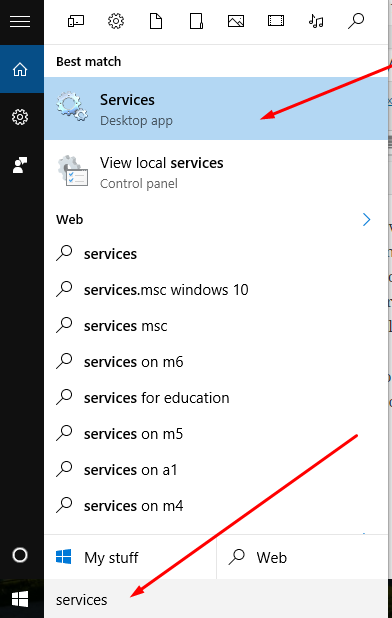
  1. In the search box located to the far left hand corner of the windows task bar , type “services”
  2. The resulting window menu pop up will list all contents that have the word “services”. Locate the one which the “Desktop app” that has the “engines” sign to itservices mysql server
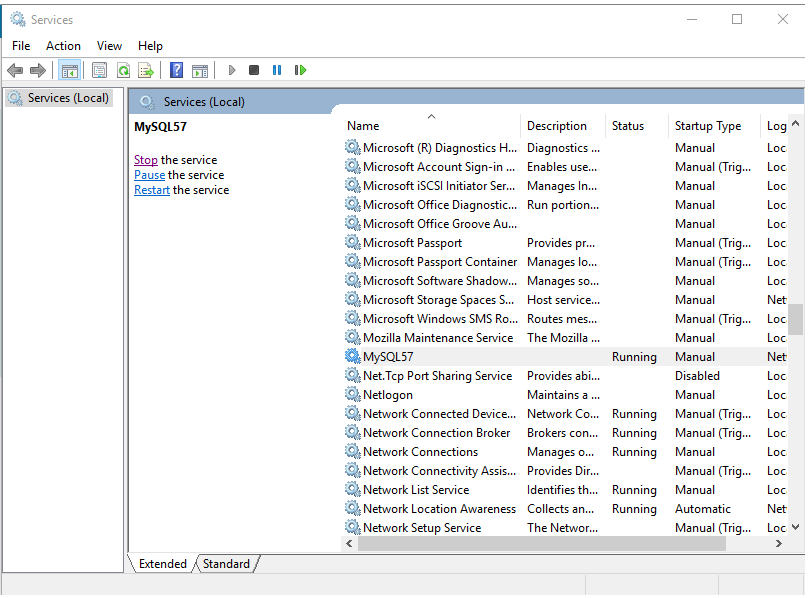
  3. Click on the “services” desktop app  and this will take you to all the services that are running on your PC with their names arranged in ALPHABETICAL ORDER
  4. Scroll down and locate MySql in the list. You will also see its status ; whether it is running or not. mysql start
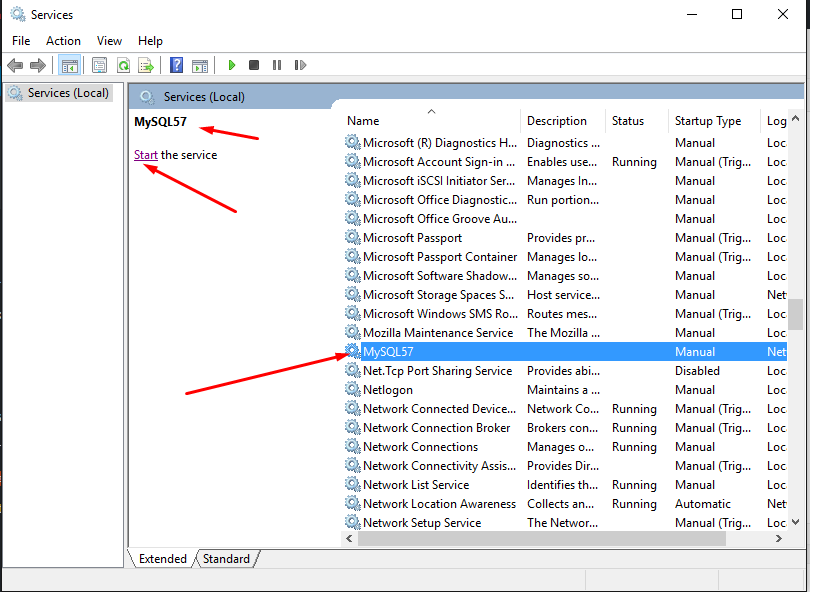
  5. In the top left corner of the window, you will see a link to start the MySql server
  6. Click on Start to start the MySQL server
  7. To STOP, PAUSE, RESTART  the server after it has started running, you will the STOP, PAUSE, RESTART links at the same location you start and you can take action appropriately from therestop mysql server
  8. Happy scripting!
Want more information like this?
Similar Posts

  • |

    Creating Oracle PL/SQL Tables for Intercollegiate Athletic Database – Data Warehousing

    Creating Oracle  tables for Intercollegiate Athletic Database. Part of Assignment one of Data Warehousing for Business Intelligence on Coursera

    After creating the tables lets insert values

      In case you want to change a constraint on a field, you can use a syntax examples as the following. ALTER TABLE FACILITY ADD CONSTRAINT UNQ_FAC UNIQUE (FACNAME)…

  • | | | | |

    Java Python R SQL Excel Compared Similarities For Data Science and Data Analytics – The Basics

    If you have ever worked with Java, Python, R, SQL, Excel and other Languages on a varied Data Science or Data Analytics projects, you will realise that all these languages have similar syntaxes, or at least, can achieve the same objective with very similar codes.   Below is a comparison and similarities of these various tools…

  • | |

    Entity Relationship Diagram – ERD and Cardinality Symbols Simple Explanations

    Understading cardinality notation and being able to explain them will go a long way in your database design and implementation. Here we look at a simple explanation of the symbols. (Credit to Data Warehousing for Business Intelligence by University of Colorado System on Coursera) Symbols in the above diagram and their meanings: – Oval: means 0 –…

  • Visual Explanation illustration and presentation of SQL JOINS query statements

    SQL Joins can sometimes be a bit confusing, particularly if you a newbie. I have below 2 visual representations which should help enhance your visual understanding of SQL JOINS First is from From CodeProject, by C L Moffatt You can check full explanation here: Sql Joins visually explained   2. Second was from Duke University….

  • |

    MySQL – Summarizing Data – SUM COUNT -MIN -MAX – AVG – DOGNITION Database

    Summarizing  Data This week we are looking at five most common aggregate functions used to summarize information stored in tables: COUNT and SUM very frequently. COUNT is the only aggregate function that can work on any type of variable. The other four aggregate functions are only appropriate for numerical data. All aggregate functions require you…

Leave a Reply

Your email address will not be published. Required fields are marked *