
Get Numbers and Percentages from Tables – Microsoft Sql Server
Sometimes you want to get some numbers and also percentages for quick analysis. This is a quick simple way to get quick overviews
Want more information like this?
Sometimes you want to get some numbers and also percentages for quick analysis. This is a quick simple way to get quick overviews
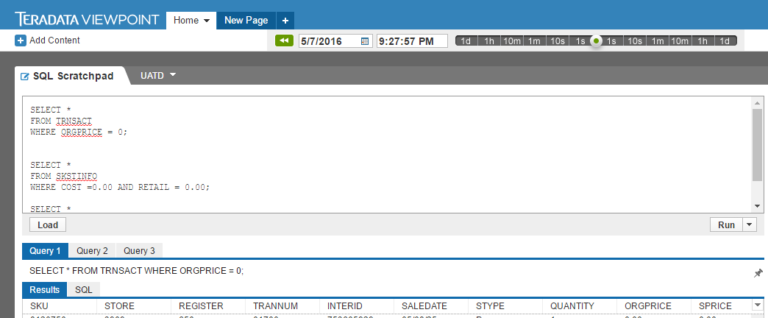
Analysing ‘Big Data’ from a database with real world data requires retrieving data from the database by writing relevant queries. As part of “Managing Big Data with MySQL” by Duke University on Cousera, I dealt with real world data that comprise hundreds to millions of entries/rows. This is the database of Dillard’s Department stores, specifically, the UA_DILLARDS that contains…
Sometimes, you would want to split values in a column into separate rows in SQL server. This is a simple guide. Lets check the fields in the table we will be working with.
|
1 2 3 4 5 6 7 |
select [orderID] ,[itemType] ,[price] ,[quantity] from [Antrak].[dbo].[ClothingSale] |
Let’s check the result: We can see that the itemType field has different values wheres as the price and quantity…
This is a short guide to getting ranking or rating from Microsoft Sql Server customers. Ranking is taken by checking how many times a customer has visited a particular country divided by the total number of travels the customer has made within the database
|
1 2 3 4 5 6 7 8 9 10 11 12 13 14 15 16 17 18 19 20 21 22 23 24 25 26 27 28 29 30 31 32 33 34 35 36 37 38 39 40 41 42 43 44 45 46 47 48 49 50 51 52 53 54 55 56 57 58 59 60 61 |
/*make a back up of the recommender rankings table*/ truncate table antrak.dbo.recommender_rankings_copy insert into antrak.dbo.recommender_rankings_copy select * from antrak.dbo.recommender_rankings /*select total number of times a customer has travelled to a specific country*/ select [First Name] ,Country , count(*) as [# times visited] into #travelpercountry FROM [Antrak].[dbo].[FlightBookingsMain] group by [First Name] ,Country order by [First Name] /*total number of times each customer has travelled to all destinations*/ select [First Name] , count(*) as [# times visited] into #totaltravel FROM [Antrak].[dbo].[FlightBookingsMain] group by [First Name] ----,Country order by [First Name] -- lets view by the total bookings select * from #totaltravel order by [First Name] -- lets view bookings per country select * from #travelpercountry order by [First Name] /*get rating*/ drop table antrak.dbo.recommender_rankings select tt.[First Name] ,Country ,cast(round((cast(tpc.[# times visited] as decimal(3,0)) / cast(tt.[# times visited] as decimal(3,0)) * 100), 1) as float) as rating into antrak.dbo.recommender_rankings from #totaltravel as tt inner join #travelpercountry as tpc on tt.[First Name] = tpc.[First Name] order by [First Name] select * from antrak.dbo.recommender_rankings /*lets refresh the temporary tables*/ drop table #totaltravel drop table #travelpercountry |
Want more information like this?
Summarizing Data This week we are looking at five most common aggregate functions used to summarize information stored in tables: COUNT and SUM very frequently. COUNT is the only aggregate function that can work on any type of variable. The other four aggregate functions are only appropriate for numerical data. All aggregate functions require you…
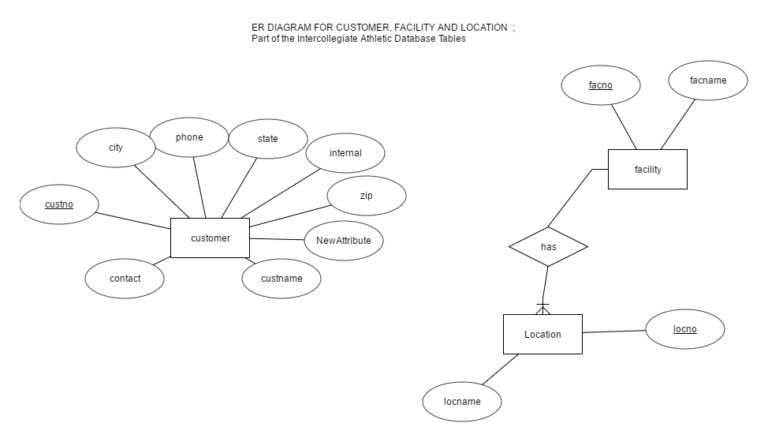
ERDPLUS One tool I generally use when working on a projects, mini tasks and exploration is the ERDPLUS tool . It is quite simple and easy to use. It is a Free tool as well. Below are some diagrams I generated when i first got in contact with with tool. ERD DIAGRAMS: 1. 2. A…

This is a sample code to use Python to connect to SQL Server Native Client.
|
1 2 3 4 5 6 7 8 9 10 11 12 13 14 15 16 17 18 |
import sqlalchemy import pyodbc try: import urllib params = urllib.quote_plus("DRIVER={SQL Server Native Client 11.0};SERVER=.\MSSQLSERVER_ENT;DATABASE=MagicDirect;Trusted_Connection=yes;") engine = sqlalchemy.create_engine('mssql+pyodbc:///?odbc_connect=%s"' % params) results.to_sql("clusterSegments", engine, if_exists = 'replace')# except (RuntimeError, TypeError, NameError): print('Error in Conneccting') print(RuntimeError, TypeError, NameError) finally: print("connected") |
Want more information like this?
An experienced DevOps and Cloud Training Company to meet your DevOps and Cloud needs
You can see how this popup was set up in our step-by-step guide: https://wppopupmaker.com/guides/auto-opening-announcement-popups/